
Home Screen
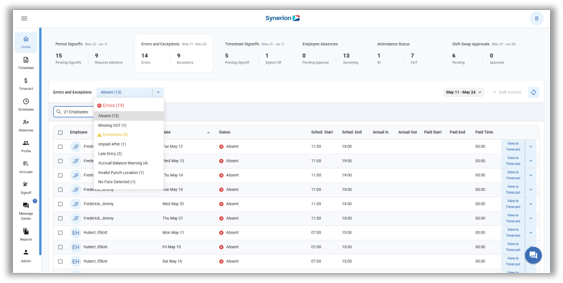
Errors and Exceptions – A new ‘Errors and Exceptions’ tab can be found on the Home screen. This tab will allow the user to fix errors and exceptions using Suggested Fixes straight from the Home screen. Bulk actions can also be used to fix multiple records in one action.
Click HERE to see an in-depth article on the functionality of the Errors and Exceptions tab, and how to use it.
Login Page
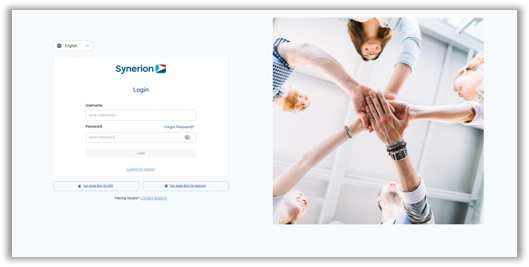
Updated Login Page – The Login page has been updated for Bolt with many improvements, including improved support for SSO, and QR codes to download the mobile app. Additionally, managers and employees will now use the same URL to login to the system.
Click HERE to see details about the new Bolt login page.
Timesheets
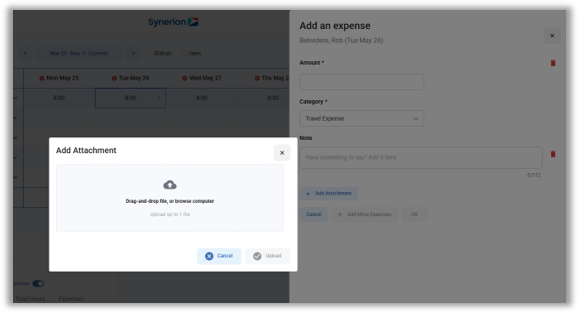
Expense Attachments – Timesheet customers can now add attachments to expense records in the Timesheet. This will allow users to attach receipts as images or other file types to support their expense submissions.
For more information about Timesheet Expense Attachments, click HERE.
Employee Profile
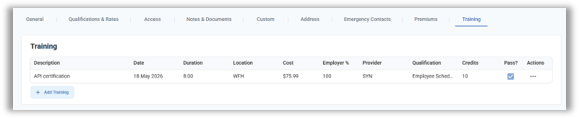
Training tab – As requested by several customers, the Training tab has been brought back to the employee profile. This screen allows users to track an employee’s training information, including dates, durations, costs, credits and qualifications.
BambooHR
Scheduled Absence Sync – BambooHR customers who use BambooHR for absence management can now import approved absences from BambooHR to Synerion Agile in order to track the absences in the time and attendance system. This allows BambooHR customers to use the BambooHR system for time off requests, and have those absences sync automatically with Synerion Agile.
Bolt 2.0 Enhancements
Undelete Employee – This enhancement restores key Classic functionality, allowing users to manage deleted employees more effectively by enabling editing of Employee Code and Payroll code of deleted employees, and supports undeleting employees while ensuring proper visibility reconfiguration in the system
Scheduler Enhancements – Several usability enhancements have been made to the scheduler, such as copying scheduled absences using drag & drop and right-click copy/paste. Additionally, the Seniority column will be hidden by default for new and existing customers, and the Department and Seniority columns will (if visible) be hidden when the side drawer is open to provide better visibility to the scheduling grid. Lastly, the Duration field now updates immediately when the start/end time of a shift changes.
Stat Holiday Absence requests – The system can now warn employees when they are submitting an absence request on a scheduled holiday, so that they can confirm whether they want to continue.
Hiding unused Work Rules and Time Categories – Unused Work Rules and Time Categories can now be hidden via the Dept Work Rule Filtering (for Work Rules) or Dept Time Category Filtering (for Time Categories). This will allow the user to hide Work Rules and Time Categories that cannot be fully deleted in the system because they are in use.